If your business uses Office 365, your users get access to OneDrive, Microsoft’s cloud storage. Your employees can upload, sync, and share documents to collaborate with colleagues. This can be a good thing, but you may want to control how employees are sharing company documents.
A user can control for sharing an individual file or folder by logging into OneDrive and right-clicking the file and clicking Share.
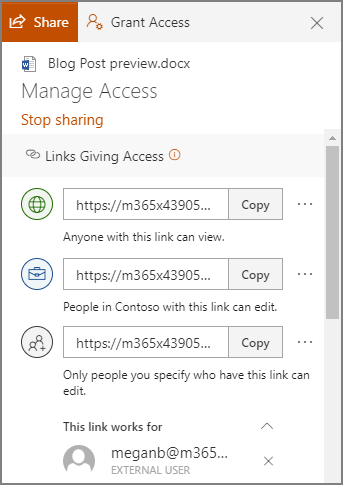
Users can send the file to an email or type in a contact name, or they can copy a link to share via email or instant messenger. By default, the access will allow users with the link to edit the document, but the user can choose to only allow them to view the file (and not make changes).
This is just on a file/folder basis though. You may want to manage the global settings to control how users can share documents.
Managing How Files are Shared in OneDrive for Users
If you are an admin of your OneDrive account, you can sign into your https://admin.microsoft.com/ account and follow these steps.
- On the left, look for Admin centers and click SharePoint.
- This should take you to the new SharePoint admin center. You may need to click Open it now to go to the new SharePoint admin center if it takes you to the old one.
- On the left, under Policies and click on Sharing.
These settings are going to be global settings for all accounts. You can manage an individual user’s settings by going to Users > Active Users, and select the user you want to manage. Each user will have a OneDrive tab, which also has Sharing options.
Privacy and security settings are really critical for businesses these days, so ensuring that you are doing everything in your power to restrict access to sensitive information is very important. The security experts at Directive can help you get control over your network and your company data. Give us a call at Directive today to get help!



Comments